Showing posts with label listview. Show all posts

Monday, July 15, 2013

Washing mashines app in two activities

I managed to separate the list of machines and the details into separated activities.
All is the same as before except details are opened into new window.

The next part would be to add image to be shown along with the details of each washing machine.

Again the data used for the machines is arbitrary so it is not 100% correct. Just for practising purpose.

My strings.xml

<?xml version="1.0" encoding="utf-8"?>
<resources>

    <string name="app_name">WashingMachines</string>
    <string name="action_settings">Settings</string>
    <string name="machine_type">Machine type</string>
    <string name="brand_name">Brand name</string>
    <string name="weight">Weight</string>
    <string name="maxRpm">Max RPM</string>
    <string name="washTemp">Washing temperature</string>
    <string name="hasEnergyStar">Has energy star</string>
    <string name="powerUsage">Power usage</string>
    <string name="title_activity_details">MainActivity</string>
    <string name="main_list_btn">To the list</string>   
</resources>


activity_main.xml now has only list view component in linear layout for listing the available machines.

Here it is:

<LinearLayout xmlns:android="http://schemas.android.com/apk/res/android"
    xmlns:tools="http://schemas.android.com/tools"
    android:layout_width="match_parent"
    android:layout_height="match_parent"
    android:orientation="vertical"
    android:paddingBottom="@dimen/activity_vertical_margin"
    android:paddingLeft="@dimen/activity_horizontal_margin"
    android:paddingRight="@dimen/activity_horizontal_margin"
    android:paddingTop="@dimen/activity_vertical_margin"
    tools:context=".MainActivity" >

    <ListView
        android:id="@+id/scroll_view"
        android:layout_width="fill_parent"
        android:layout_height="fill_parent"
        android:orientation="vertical" >
    </ListView>

</LinearLayout>


A new layout is added for the DetailsActivity.java, details.xml.
<LinearLayout xmlns:android="http://schemas.android.com/apk/res/android"
    xmlns:tools="http://schemas.android.com/tools"
    android:layout_width="match_parent"
    android:layout_height="match_parent"
    android:orientation="vertical"
    android:paddingBottom="@dimen/activity_vertical_margin"
    android:paddingLeft="@dimen/activity_horizontal_margin"
    android:paddingRight="@dimen/activity_horizontal_margin"
    android:paddingTop="@dimen/activity_vertical_margin"
    tools:context=".DetailsActivity" >

            android:layout_width="fill_parent"
        android:layout_height="wrap_content"
        android:orientation="horizontal" >

                    android:layout_width="140dp"
            android:layout_height="wrap_content"
            android:layout_marginRight="5dp"
            android:text="@string/machine_type" />

                    android:id="@+id/machine_type_view"
            android:layout_width="fill_parent"
            android:layout_height="wrap_content"
            android:hint="@string/machine_type" />


            android:layout_width="fill_parent"
        android:layout_height="wrap_content"
        android:orientation="horizontal" >

                    android:layout_width="140dp"
            android:layout_height="wrap_content"
            android:layout_marginRight="5dp"
            android:text="@string/brand_name" />

                    android:id="@+id/brand_name_view"
            android:layout_width="fill_parent"
            android:layout_height="wrap_content"
            android:hint="@string/brand_name" />


            android:layout_width="fill_parent"
        android:layout_height="wrap_content"
        android:orientation="horizontal" >

                    android:layout_width="140dp"
            android:layout_height="wrap_content"
            android:layout_marginRight="5dp"
            android:text="@string/weight" />

                    android:id="@+id/weight_view"
            android:layout_width="fill_parent"
            android:layout_height="wrap_content"
            android:hint="@string/weight" />


            android:layout_width="fill_parent"
        android:layout_height="wrap_content"
        android:orientation="horizontal" >

                    android:layout_width="140dp"
            android:layout_height="wrap_content"
            android:layout_marginRight="5dp"
            android:text="@string/maxRpm" />

                    android:id="@+id/max_rpm_view"
            android:layout_width="fill_parent"
            android:layout_height="wrap_content"
            android:hint="@string/maxRpm" />


            android:layout_width="fill_parent"
        android:layout_height="wrap_content"
        android:orientation="horizontal" >

                    android:layout_width="140dp"
            android:layout_height="wrap_content"
            android:layout_marginRight="5dp"
            android:text="@string/washTemp" />

                    android:id="@+id/wash_temp_view"
            android:layout_width="fill_parent"
            android:layout_height="wrap_content"
            android:hint="@string/washTemp" />


            android:layout_width="fill_parent"
        android:layout_height="wrap_content"
        android:orientation="horizontal" >

                    android:layout_width="140dp"
            android:layout_height="wrap_content"
            android:layout_marginRight="5dp"
            android:text="@string/hasEnergyStar" />

                    android:id="@+id/has_energy_star_view"
            android:layout_width="fill_parent"
            android:layout_height="wrap_content"
            android:hint="@string/hasEnergyStar" />


            android:layout_width="fill_parent"
        android:layout_height="wrap_content"
        android:orientation="horizontal" >

                    android:layout_width="140dp"
            android:layout_height="wrap_content"
            android:layout_marginRight="5dp"
            android:text="@string/powerUsage" />

                    android:id="@+id/power_usage_view"
            android:layout_width="fill_parent"
            android:layout_height="wrap_content"
            android:hint="@string/powerUsage" />


           android:id="@+id/main_list_btn"
        android:layout_width="wrap_content"
        android:layout_height="wrap_content"
        android:text="@string/main_list_btn" />


It contains all the text fields for showing data about clicked machine from the main list. I used the wizard to add new android activity and it created details.xml layout file automatically.

Right click on your project node in Projects Tab -> New -> Other -> Android Activity

Name you new activity as you like I named it DetailsActivity and details.xml

Now about java classes.

WashingMachine.java stays the same as in previous post.

MainActivity.java look like this:

package com.example.washingmachines;

import java.util.ArrayList;
import java.util.List;

import android.os.Bundle;
import android.app.Activity;
import android.content.Intent;
import android.view.Menu;
import android.view.View;
import android.widget.AdapterView;
import android.widget.AdapterView.OnItemClickListener;
import android.widget.ArrayAdapter;
import android.widget.ListView;

public class MainActivity extends Activity {

    private ListView machines = null;
    private List listOfMachines = new ArrayList();
    private ArrayAdapter adapter = null;
    private List machinesList = new ArrayList();
   
   
    @Override
    protected void onCreate(Bundle savedInstanceState) {
        super.onCreate(savedInstanceState);
        setContentView(R.layout.activity_main);

        initView();
    }

    private void initView() {

        this.machines = (ListView) findViewById(R.id.scroll_view);

        WashingMachine wm1 = new WashingMachine("front", "LG", 65, 1200, 41,
                false, 100);
        this.listOfMachines.add(wm1);

        WashingMachine wm2 = new WashingMachine("top", "Samsung", 73, 800, 60,
                false, 90);
        this.listOfMachines.add(wm2);

        WashingMachine wm3 = new WashingMachine("hybrid", "BSH", 52, 1650, 36,
                true, 70);
        this.listOfMachines.add(wm3);

        WashingMachine wm4 = new WashingMachine("top", "Whirlpool", 105, 1400,
                56, false, 150);
        this.listOfMachines.add(wm4);

        WashingMachine wm5 = new WashingMachine("front", "Gorenje", 360, 2000,
                70, false, 300);
        this.listOfMachines.add(wm5);

        WashingMachine wm6 = new WashingMachine("hybrid", "Videocon", 300,
                2000, 85, false, 310);
        this.listOfMachines.add(wm6);

        this.machinesList.add(this.listOfMachines.get(0).getBrandName());
        this.machinesList.add(this.listOfMachines.get(1).getBrandName());
        this.machinesList.add(this.listOfMachines.get(2).getBrandName());
        this.machinesList.add(this.listOfMachines.get(3).getBrandName());
        this.machinesList.add(this.listOfMachines.get(4).getBrandName());
        this.machinesList.add(this.listOfMachines.get(5).getBrandName());

        this.adapter = new ArrayAdapter(this,
                android.R.layout.simple_list_item_1, this.machinesList);
        this.machines.setAdapter(adapter);

        this.machines.setOnItemClickListener(new OnItemClickListener() {
            @Override
            public void onItemClick(AdapterView arg0, View arg1, int arg2,
                    long arg3) {
                Intent k = new Intent(MainActivity.this, DetailsActivity.class);
                k.putExtra("type", listOfMachines.get(arg2).getType());
                k.putExtra("brandName", listOfMachines.get(arg2).getBrandName());
                k.putExtra("weight", listOfMachines.get(arg2).getWeight());
                k.putExtra("maxRpm", listOfMachines.get(arg2).getMaxRpm());
                k.putExtra("washTemp", listOfMachines.get(arg2).getWashTemp());
                k.putExtra("hasEnergyStar", listOfMachines.get(arg2).isHasEnergyStar());
                k.putExtra("powerUsage", listOfMachines.get(arg2).getPowerUsage());
                startActivity(k);

            }
        });

    }

    @Override
    public boolean onCreateOptionsMenu(Menu menu) {
        // Inflate the menu; this adds items to the action bar if it is present.
        getMenuInflater().inflate(R.menu.main, menu);
        return true;
    }

}


I create new Intent that launches DetailsActivity and put data from the clicked machine into the new intent using putExtra() method. Than I start the new activity

Intent k = new Intent(MainActivity.this, DetailsActivity.class);

k.putExtra("type", listOfMachines.get(arg2).getType());
                

k.putExtra("brandName", listOfMachines.get(arg2).getBrandName());
                

k.putExtra("weight", listOfMachines.get(arg2).getWeight());
               

 k.putExtra("maxRpm", listOfMachines.get(arg2).getMaxRpm());
               

 k.putExtra("washTemp", listOfMachines.get(arg2).getWashTemp());
                

k.putExtra("hasEnergyStar", listOfMachines.get(arg2).isHasEnergyStar());
                

k.putExtra("powerUsage", listOfMachines.get(arg2).getPowerUsage());
                

startActivity(k);

arg2 is the index of the clicked item in the list view.

Now the last class is DetailsActivity.java which read the extra data sent to it and fills the text views that reside inside it.

package com.example.washingmachines;

import java.util.ArrayList;
import java.util.List;

import android.os.Bundle;
import android.app.Activity;
import android.view.Menu;
import android.view.View;
import android.view.View.OnClickListener;
import android.widget.Button;
import android.widget.TextView;

public class DetailsActivity extends Activity {

    private TextView type = null;
    private TextView brandName = null;
    private TextView weight = null;
    private TextView maxRmp = null;
    private TextView washTemp = null;
    private TextView hasEnergyStar = null;
    private TextView powerUsage = null;
    private Button mainListBtn = null;
   
    @Override
    protected void onCreate(Bundle savedInstanceState) {
        super.onCreate(savedInstanceState);
        setContentView(R.layout.details);
      
        this.type = (TextView) findViewById(R.id.machine_type_view);
        this.brandName = (TextView) findViewById(R.id.brand_name_view);
        this.weight = (TextView) findViewById(R.id.weight_view);
        this.maxRmp = (TextView) findViewById(R.id.max_rpm_view);
        this.washTemp = (TextView) findViewById(R.id.wash_temp_view);
        this.hasEnergyStar = (TextView) findViewById(R.id.has_energy_star_view);
        this.powerUsage = (TextView) findViewById(R.id.power_usage_view);
      
        String typeValue = getIntent().getStringExtra("type");
        this.type.setText(typeValue);
      
        String brandNameValue  = getIntent().getStringExtra("brandName");
        this.brandName.setText(brandNameValue);
      
        String weightValue  = getIntent().getStringExtra("weight");
        this.weight.setText(weightValue);
      
        String maxRpmValue  = getIntent().getStringExtra("maxRpm");
        maxRmp.setText(maxRpmValue);
      
        String washTempValue  = getIntent().getStringExtra("washTemp");
        washTemp.setText(washTempValue);
      
        String hasEnergyStarValue = getIntent().getBooleanExtra("hasEnergyStar", false) ? "yes" : "no";
        hasEnergyStar.setText(hasEnergyStarValue);
      
        String powerUsageValue  = getIntent().getStringExtra("powerUsage");
        powerUsage.setText(powerUsageValue);
      
        this.mainListBtn = (Button) findViewById(R.id.main_list_btn);
        this.mainListBtn.setOnClickListener(new OnClickListener() {
          
            @Override
            public void onClick(View arg0) {
                finish();
            }
        });
    }

    @Override
    public boolean onCreateOptionsMenu(Menu menu) {
        // Inflate the menu; this adds items to the action bar if it is present.
        getMenuInflater().inflate(R.menu.details, menu);
        return true;
    }

}


I read the extra data using getString/getInt/getBoolean etc... methods inside the intent returned by getIntent() method.

Example:

String powerUsageValue  = getIntent().getStringExtra("powerUsage");
powerUsage.setText(powerUsageValue);

Now the next question is how do I return back to the list. I added a button for this in the details.xml layout file. And I use finish() method to close and destroy the instance of the current activity. Afterwards the focus is returned to the MainActivity of the application.


 this.mainListBtn = (Button) findViewById(R.id.main_list_btn);
        this.mainListBtn.setOnClickListener(new OnClickListener() {
          
            @Override
            public void onClick(View arg0) {
                finish();
            }
        });


Result images:


machines list

machine details

Washing Machines app in android

I managed to create a simple application that uses ListView component and couple of TextView components to store and show data about several washing machines I collected from wikipedia.

Some of the data about machines is arbitrary so not all info is correct. This is just a practice for Android.

strings.xml

<?xml version="1.0" encoding="utf-8"?>
<resources>

    <string name="app_name">WashingMachines</string>
    <string name="action_settings">Settings</string>
    <string name="hello_world">Hello world!</string>
    <string name="machine_type">Machine type</string>
    <string name="brand_name">Brand name</string>
    <string name="weight">Weight</string>
    <string name="maxRpm">Max RPM</string>
    <string name="washTemp">Washing temperature</string>
    <string name="hasEnergyStar">Has energy star</string>
    <string name="powerUsage">Power usage</string>
</resources>


activity_main.xml

<LinearLayout xmlns:android="http://schemas.android.com/apk/res/android"
    xmlns:tools="http://schemas.android.com/tools"
    android:layout_width="match_parent"
    android:layout_height="match_parent"
    android:orientation="vertical"
    android:paddingBottom="@dimen/activity_vertical_margin"
    android:paddingLeft="@dimen/activity_horizontal_margin"
    android:paddingRight="@dimen/activity_horizontal_margin"
    android:paddingTop="@dimen/activity_vertical_margin"
    tools:context=".MainActivity" >

    <ListView
        android:id="@+id/scroll_view"
        android:layout_width="fill_parent"
        android:layout_height="200dp"
        android:orientation="vertical" >
    </ListView>

    <LinearLayout
        android:layout_width="fill_parent"
        android:layout_height="wrap_content"
        android:orientation="horizontal" >

        <TextView
            android:layout_width="140dp"
            android:layout_height="wrap_content"
            android:layout_marginRight="5dp"
            android:text="@string/machine_type" />

        <TextView
            android:id="@+id/machine_type_view"
            android:layout_width="fill_parent"
            android:layout_height="wrap_content"
            android:hint="@string/machine_type" />
    </LinearLayout>

    <LinearLayout
        android:layout_width="fill_parent"
        android:layout_height="wrap_content"
        android:orientation="horizontal" >

        <TextView
            android:layout_width="140dp"
            android:layout_height="wrap_content"
            android:layout_marginRight="5dp"
            android:text="@string/brand_name" />

        <TextView
            android:id="@+id/brand_name_view"
            android:layout_width="fill_parent"
            android:layout_height="wrap_content"
            android:hint="@string/brand_name" />
    </LinearLayout>

    <LinearLayout
        android:layout_width="fill_parent"
        android:layout_height="wrap_content"
        android:orientation="horizontal" >

        <TextView
            android:layout_width="140dp"
            android:layout_height="wrap_content"
            android:layout_marginRight="5dp"
            android:text="@string/weight" />

        <TextView
            android:id="@+id/weight_view"
            android:layout_width="fill_parent"
            android:layout_height="wrap_content"
            android:hint="@string/weight" />
    </LinearLayout>

    <LinearLayout
        android:layout_width="fill_parent"
        android:layout_height="wrap_content"
        android:orientation="horizontal" >

        <TextView
            android:layout_width="140dp"
            android:layout_height="wrap_content"
            android:layout_marginRight="5dp"
            android:text="@string/maxRpm" />

        <TextView
            android:id="@+id/max_rpm_view"
            android:layout_width="fill_parent"
            android:layout_height="wrap_content"
            android:hint="@string/maxRpm" />
    </LinearLayout>

    <LinearLayout
        android:layout_width="fill_parent"
        android:layout_height="wrap_content"
        android:orientation="horizontal" >

        <TextView
            android:layout_width="140dp"
            android:layout_height="wrap_content"
            android:layout_marginRight="5dp"
            android:text="@string/washTemp" />

        <TextView
            android:id="@+id/wash_temp_view"
            android:layout_width="fill_parent"
            android:layout_height="wrap_content"
            android:hint="@string/washTemp" />
    </LinearLayout>

    <LinearLayout
        android:layout_width="fill_parent"
        android:layout_height="wrap_content"
        android:orientation="horizontal" >

        <TextView
            android:layout_width="140dp"
            android:layout_height="wrap_content"
            android:layout_marginRight="5dp"
            android:text="@string/hasEnergyStar" />

        <TextView
            android:id="@+id/has_energy_star_view"
            android:layout_width="fill_parent"
            android:layout_height="wrap_content"
            android:hint="@string/hasEnergyStar" />
    </LinearLayout>

    <LinearLayout
        android:layout_width="fill_parent"
        android:layout_height="wrap_content"
        android:orientation="horizontal" >

        <TextView
            android:layout_width="140dp"
            android:layout_height="wrap_content"
            android:layout_marginRight="5dp"
            android:text="@string/powerUsage" />

        <TextView
            android:id="@+id/power_usage_view"
            android:layout_width="fill_parent"
            android:layout_height="wrap_content"
            android:hint="@string/powerUsage" />
    </LinearLayout>

</LinearLayout>


Helper class: WashingMachine.java

package com.example.washingmachines;

public class WashingMachine {
    private String type; // top, front, hybrid
    private String brandName; // LG, Samsung, BSH, Whirlpool, Videocon, Gorenje
    private int weight; // 60kg, 80kg, 150kg, 220kg, 360kg
    private int maxRpm; // 800, 1200, 1600, 2000
    private int washTemp; // 40C, 36C
    private boolean hasEnergyStar;
    private int powerUsage; // 100kwh, 150kwh, 200kwh

    public WashingMachine() {

    }

    public WashingMachine(String type, String brandName, int weight,
            int maxRpm, int washTemp, boolean hasEnergyStar, int powerUsage) {
        super();
        this.type = type;
        this.brandName = brandName;
        this.weight = weight;
        this.maxRpm = maxRpm;
        this.washTemp = washTemp;
        this.hasEnergyStar = hasEnergyStar;
        this.powerUsage = powerUsage;
    }

    public String getType() {
        return type;
    }

    public String getBrandName() {
        return brandName;
    }

    public String getWeight() {
        return String.valueOf(weight) + " kg";
    }

    public String getMaxRpm() {
        return String.valueOf(maxRpm) + " rpm";
    }

    public String getWashTemp() {
        return String.valueOf(washTemp) + " C";
    }

    public boolean isHasEnergyStar() {
        return hasEnergyStar;
    }

    public String getPowerUsage() {
        return String.valueOf(powerUsage) + " KWh";
    }

}


MainActivity.java

package com.example.washingmachines;

import java.util.ArrayList;
import java.util.List;

import android.os.Bundle;
import android.app.Activity;
import android.view.Menu;
import android.view.View;
import android.widget.AdapterView.OnItemClickListener;
import android.widget.AdapterView;
import android.widget.ArrayAdapter;
import android.widget.ListView;
import android.widget.TextView;

public class MainActivity extends Activity {
    private ListView machines = null;
    private List<WashingMachine> listOfMachines = new ArrayList<WashingMachine>();
    private ArrayAdapter<String> adapter = null;
    private List<String> machinesList = new ArrayList<String>();
    private TextView type = null;
    private TextView brandName = null;
    private TextView weight = null;
    private TextView maxRmp = null;
    private TextView washTemp = null;
    private TextView hasEnergyStar = null;
    private TextView powerUsage = null;

    @Override
    protected void onCreate(Bundle savedInstanceState) {
        super.onCreate(savedInstanceState);
        setContentView(R.layout.activity_main);

        initView();
    }

    private void initView() {

        this.machines = (ListView) findViewById(R.id.scroll_view);
       
        WashingMachine wm1 = new WashingMachine("front", "LG", 65,
                1200, 41, false, 100);
        this.listOfMachines.add(wm1);
       
        WashingMachine wm2 = new WashingMachine("top", "Samsung", 73,
                800, 60, false, 90);
        this.listOfMachines.add(wm2);
       
        WashingMachine wm3 = new WashingMachine("hybrid", "BSH", 52,
                1650, 36, true, 70);
        this.listOfMachines.add(wm3);
       
        WashingMachine wm4 = new WashingMachine("top", "Whirlpool", 105,
                1400, 56, false, 150);
        this.listOfMachines.add(wm4);
       
        WashingMachine wm5 = new WashingMachine("front", "Gorenje", 360,
                2000, 70, false, 300);
        this.listOfMachines.add(wm5);
       
        WashingMachine wm6 = new WashingMachine("hybrid", "Videocon", 300,
                2000, 85, false, 310);
        this.listOfMachines.add(wm6);
       
        this.machinesList.add(this.listOfMachines.get(0).getBrandName());
        this.machinesList.add(this.listOfMachines.get(1).getBrandName());
        this.machinesList.add(this.listOfMachines.get(2).getBrandName());
        this.machinesList.add(this.listOfMachines.get(3).getBrandName());
        this.machinesList.add(this.listOfMachines.get(4).getBrandName());
        this.machinesList.add(this.listOfMachines.get(5).getBrandName());
       
        this.type = (TextView) findViewById(R.id.machine_type_view);
        this.brandName = (TextView) findViewById(R.id.brand_name_view);
        this.weight = (TextView) findViewById(R.id.weight_view);
        this.maxRmp = (TextView) findViewById(R.id.max_rpm_view);
        this.washTemp = (TextView) findViewById(R.id.wash_temp_view);
        this.hasEnergyStar = (TextView) findViewById(R.id.has_energy_star_view);
        this.powerUsage = (TextView) findViewById(R.id.power_usage_view);
       
        this.adapter = new ArrayAdapter<String>(this,
                android.R.layout.simple_list_item_1, this.machinesList);
        this.machines.setAdapter(adapter);
       
        this.machines.setOnItemClickListener(new OnItemClickListener() {
            @Override
            public void onItemClick(AdapterView<?> arg0, View arg1, int arg2,
                    long arg3) {
                type.setText(listOfMachines.get(arg2).getType());
                brandName.setText(listOfMachines.get(arg2).getBrandName());
                weight.setText(listOfMachines.get(arg2).getWeight());
                maxRmp.setText(listOfMachines.get(arg2).getMaxRpm());
                washTemp.setText(listOfMachines.get(arg2).getWashTemp());
                hasEnergyStar.setText(listOfMachines.get(arg2).isHasEnergyStar() ? "yes" : "no");
                powerUsage.setText(listOfMachines.get(arg2).getPowerUsage());
               
            }
        });


    }

    @Override
    public boolean onCreateOptionsMenu(Menu menu) {
        // Inflate the menu; this adds items to the action bar if it is present.
        getMenuInflater().inflate(R.menu.main, menu);
        return true;
    }

}


Result image

result

Friday, July 12, 2013

My tuts on GitHub

Hello. I Have create my GitHub account and I have added the last practice for ListView in Android.

You can check it here: https://github.com/bluePlayer/practices

Monday, July 8, 2013

ListView Practice

In this post I will show you what I did practicing with ListView in Android.

Here is my activity_main.xml

<LinearLayout xmlns:android="http://schemas.android.com/apk/res/android"
    xmlns:tools="http://schemas.android.com/tools"
    android:layout_width="match_parent"
    android:layout_height="match_parent"
    android:paddingBottom="@dimen/activity_vertical_margin"
    android:paddingLeft="@dimen/activity_horizontal_margin"
    android:paddingRight="@dimen/activity_horizontal_margin"
    android:paddingTop="@dimen/activity_vertical_margin"
    tools:context=".MainActivity"
    android:orientation="vertical">

    <LinearLayout
        android:layout_width="match_parent"
        android:layout_height="wrap_content"
        android:orientation="horizontal">
        <EditText
            android:id="@+id/category_edit"
            android:layout_height="wrap_content"
            android:layout_width="250dp"
            android:text="@string/edit_category"
            android:inputType="text"/>
    </LinearLayout>
    <LinearLayout
        android:layout_width="match_parent"
        android:layout_height="wrap_content"
        android:orientation="horizontal">
        <EditText
            android:id="@+id/product_edit"
            android:layout_width="250dp"
            android:layout_height="wrap_content"
            android:text="@string/edit_product"
            android:inputType="text"/>
    </LinearLayout>
    <LinearLayout
        android:layout_width="match_parent"
        android:layout_height="wrap_content"
        android:orientation="horizontal">
        <Button
            android:id="@+id/add_product_btn"
            android:layout_width="wrap_content"
            android:layout_height="wrap_content"
            android:text="@string/add_product_btn"/>
        <Button
            android:id="@+id/update_product_btn"
            android:layout_width="wrap_content"
            android:layout_height="wrap_content"
            android:text="@string/update_product_btn"/>
        <Button
            android:id="@+id/delete_product_btn"
            android:layout_width="wrap_content"
            android:layout_height="wrap_content"
            android:text="@string/delete_product_btn"/>
    </LinearLayout>
    <ListView android:id="@+id/products_view"
            android:layout_width="wrap_content"
            android:layout_height="wrap_content"
            />
</LinearLayout>

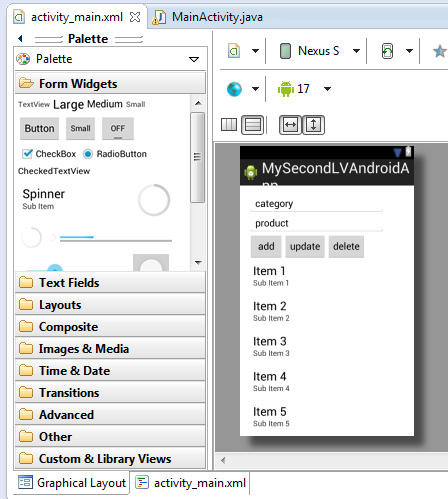
It looks like this:

Basically I have two edit text fields. In the first I edit product category and in the second I edit the product name. When I press add new item is added in the list view below. I keep track of current list item with integer index number and I increment or decrement it when adding or deleting item from the list. I added simple validation for the input data. I guess it is not enough but it will do good for this post. I used something like this for validation:

 Toast.makeText(v.getContext(), "Error message", Toast.LENGTH_LONG).show();

Here is my code:

package com.example.mysecondlvandroidapp;

import java.util.ArrayList;
import java.util.List;
import android.os.Bundle;
import android.app.Activity;
import android.view.Menu;
import android.view.View;
import android.view.View.OnClickListener;
import android.widget.AdapterView.OnItemClickListener;
import android.widget.AdapterView;
import android.widget.ArrayAdapter;
import android.widget.Button;
import android.widget.EditText;
import android.widget.ListView;
import android.widget.Toast;

public class MainActivity extends Activity {

    private int currentProductIndex = -1;
    private List<String> productsList = new ArrayList<String>();
    private EditText categoryEdit = null;
    private EditText productEdit = null;
    private Button addProductBtn = null;
    private Button updateProductBtn = null;
    private Button deleteProductBtn = null;

    private ArrayAdapter<String> adapter = null;
    private ListView productsView = null;

    @Override
    protected void onCreate(Bundle savedInstanceState) {
        super.onCreate(savedInstanceState);
        setContentView(R.layout.activity_main);

        initView();
    }

    private void initView() {

        this.categoryEdit = (EditText) findViewById(R.id.category_edit);
        this.productEdit = (EditText) findViewById(R.id.product_edit);

        this.addProductBtn = (Button) findViewById(R.id.add_product_btn);
        this.addProductBtn.setOnClickListener(new OnClickListener() {

            @Override
            public void onClick(View v) {

                String categoryStr = categoryEdit.getText().toString();
                if (categoryStr.equals("category")) {
                    Toast.makeText(v.getContext(), "Edit category!",
                            Toast.LENGTH_LONG).show();
                } else {

                    String productStr = productEdit.getText().toString();
                    if (productStr.equals("product")) {
                        Toast.makeText(v.getContext(), "Edit product!",
                                Toast.LENGTH_LONG).show();
                    } else {
                        String listViewItem = categoryStr + " - " + productStr;
                        currentProductIndex += 1;
                        adapter.add(listViewItem);
                       
                    }
                }

            }
        });

        this.updateProductBtn = (Button) findViewById(R.id.update_product_btn);
        this.updateProductBtn.setOnClickListener(new OnClickListener() {

            @Override
            public void onClick(View v) {
                if (currentProductIndex > -1) {
                    String categoryStr = categoryEdit.getText().toString();
                    String productStr = productEdit.getText().toString();
                    String listViewItem = categoryStr + " - " + productStr;
                    productsList.set(currentProductIndex, listViewItem);
                    runOnUiThread(new Runnable() {
                        @Override
                        public void run() {
                                adapter.notifyDataSetChanged();
                        }
                       
                    });
                } else {
                    Toast.makeText(v.getContext(), "List is empty!",
                            Toast.LENGTH_LONG).show();
                }

            }
        });

        this.deleteProductBtn = (Button) findViewById(R.id.delete_product_btn);
        this.deleteProductBtn.setOnClickListener(new OnClickListener() {

            @Override
            public void onClick(View v) {
                if (currentProductIndex > -1) {
                    productsList.remove(currentProductIndex);
                    currentProductIndex -= 1;
                    runOnUiThread(new Runnable() {
                        @Override
                        public void run() {
                                adapter.notifyDataSetChanged();
                        }
                       
                    });
                } else {
                    Toast.makeText(v.getContext(), "List is empty!",
                            Toast.LENGTH_LONG).show();
                }

            }
        });

        this.adapter = new ArrayAdapter<String>(this,
                android.R.layout.simple_list_item_1, productsList);
       
        this.productsView = (ListView) findViewById(R.id.products_view);
        this.productsView.setAdapter(adapter);
        this.productsView.setOnItemClickListener(new OnItemClickListener() {
            @Override
            public void onItemClick(AdapterView<?> arg0, View arg1, int arg2,
                    long arg3) {
                Toast.makeText(arg1.getContext(), productsList.get(arg2),
                        Toast.LENGTH_SHORT).show();

            }
        });
    }

    @Override
    public boolean onCreateOptionsMenu(Menu menu) {
        // Inflate the menu; this adds items to the action bar if it is present.
        getMenuInflater().inflate(R.menu.main, menu);
        return true;
    }

}


I run this function:

      runOnUiThread(new Runnable() {
                  @Override
                   public void run() {
                         adapter.notifyDataSetChanged();
                   }
                       
      });

after updating or deleting to update the ListView with new changes. I guess there is a better way to do this but for now I think it is ok.

Here are some of the screen shots I made developing this small application.


There was an extra button for category. I removed it.

Add product functionality.

update and delete functionality

Test on Nexus 7 AVD